How to Build and Deploy an AI Agent in Your Business
By Alexandre Saint-Jean
Audio version
Audio version produced by text-to-speech from the article. Our AI charter
Building an AI agent in your business does not start with choosing a tool. It starts with a simple question: which task deserves to be automated, and for what measurable gain? Once that use case is identified, the rest follows naturally: pick your approach, connect the tools, put safeguards in place and move to production step by step. Here is the full path, stage by stage.
How do you identify the right use case for your first agent?
The first mistake is starting from a tool rather than a problem. An AI agent only earns its place on a narrow scope: a repetitive task, clear rules and a measurable result. Outside that frame, the risk of error rises without a matching rise in value created.
Four criteria help qualify a good first use case. The task is irritating for your team (it eats up time without adding value). It is bounded in its inputs and outputs. Its result can be measured concretely: time saved, error rate reduced, volume processed. And it does not touch a critical decision if the agent gets it wrong. This fourth criterion is the one most often underestimated on a first project.
Examples come up naturally in almost every small business: consolidating supplier invoices, qualifying inbound emails, updating product records, or reconciling data between two systems. They share the same traits: structured data, stable rules, an immediately measurable time saving, and limited consequences if something goes wrong.
For businesses that want to formalise this inventory, a structured assessment maps candidate processes, prices the expected gain and identifies the schemes available. In France, Bpifrance's Diag Data IA scheme covers up to 40% of consulting costs for eligible SMEs (2025 figures). That is the focus of our funded AI assessment for finance functions, a natural first step before committing a development budget.
No-code or custom development: how do you choose?
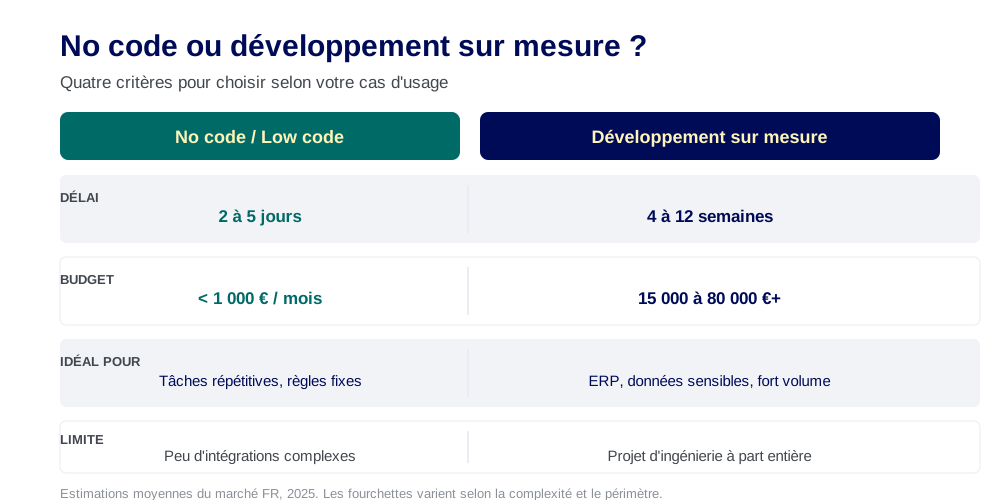
The right question is not "what's the best tool" but "how much complexity does my use case actually need". No-code suits assembly-type tasks: the agent pulls data from a source, transforms it with simple rules and pushes it to a destination. Platforms such as n8n or Microsoft Copilot Studio let you build this kind of agent without writing a line of code, in a matter of days.
Custom development becomes necessary once the decision logic gets complex, the data is sensitive, or the agent needs to handle high volume. The line usually sits around three criteria: the number of integrations required, how demanding the traceability requirements are, and whether confidential data is involved. A review of the five leading no-code platforms is covered in our practical guide to no-code AI agent tools, which covers the strengths and limits of each.
What budget should you plan for, depending on the approach?
A no-code agent on a simple task can be configured in two to five days, with monthly running costs from a few dozen to a few hundred euros. A custom agent wired into an ERP, with access management and production oversight, represents several weeks of development and an integration budget between €15,000 and €80,000 depending on scope. That is not the same investment, and it is not the same level of control over your data. Both approaches can coexist in the same organisation, each on the type of task it suits.
How do you connect the agent to your business tools?
An agent without access to your data only reasons in a vacuum. The value comes from the connections: your ERP, your inbox, your document store, your dashboards. These connections go through tools or connectors, and standardising them becomes a central technical challenge as the number of integrations grows.
The Model Context Protocol (MCP), launched by Anthropic in late 2024, has become a de facto standard for connecting an agent to software and data sources. Rather than building a specific integration for each connection, an MCP server exposes a set of capabilities the agent can call as needed. You gain reusability, reduce technical debt and make it easier to add new tools. The practical detail, with configuration examples, is covered in our guide to connecting an AI agent to your tools via MCP. The infrastructure behind these agents keeps moving fast too: see what the summer 2026 tech deals mean for a small business.
Connecting an agent to an ERP such as SAP, Sage or Dynamics remains a project in its own right. You need to define which data the agent can read and write, manage access rights by role, make sure API calls do not disrupt existing processes, and keep data consistent across systems. Handling network errors, timeouts and duplicates is itself a non-trivial engineering topic. AI in your ERP and information systems covers these constraints for a small or mid-sized business that does not have a dedicated infrastructure team.
What safeguards should you put in place before launching the agent?
An agent without a defined scope quickly becomes unmanageable. The first rule is to explicitly bound what the agent can and cannot do. In practice that means a list of access rights (what data it can read and write), a list of authorised actions, and an explicit list of situations where it must ask a human for confirmation. These safeguards do not slow the agent down: they make it usable over time, and they make it easier for teams to adopt.
Human validation on high-stakes decisions is not a brake on automation, it is a condition for successful adoption. Anthropic's recommended approach to building effective agents, published in late 2024, stresses keeping a human in the loop for irreversible actions: sending an email, changing a customer record, approving a supplier order. The agent prepares and proposes, the human confirms before execution. This design avoids errors that are hard to correct and reassures business teams about their own role.
Traceability is the third pillar. Every action the agent takes must be logged with its context: what input triggered the decision, what action was executed, what result came out of it. Without a trail, you cannot diagnose an error, explain to a partner or an auditor what happened, or learn from the agent's own mistakes. For high-risk systems under the EU AI Act, in force since 2024, traceability is a legal requirement, not just good practice.
How do you move from pilot to reliable production?
The move from pilot to production is the stage that gets systematically underestimated. An agent that performs well on a hundred cases can stumble on the hundred-and-first if the input data is malformed, a third-party service is briefly unavailable, or a user steps outside the planned scope. Robustness is built through iteration, not exhaustive planning.
Three conditions let you move to production with confidence. First, active monitoring: the right metric is not "the agent is running" but "how many actions completed without human intervention this week, and how many triggered an alert". Second, a simple, low-friction way for business teams to flag anomalies. Third, an explicit fallback procedure: if the agent is unavailable or produces unreliable results, the manual process must remain available without delay or extra training.
Scaling up raises different questions from the pilot. Once an agent handles significant volumes, API costs add up, error handling needs to be automated, and the agent's memory needs careful management to avoid context drift. This is the stage where an agent's internal architecture (its reasoning loop, state management, error recovery mechanisms) becomes a genuine engineering topic. We laid out these foundations in our full definition of an AI agent and how it works, which explains why sophistication is not an end in itself. It is also the point where the delivery model matters as much as the code: the forward deployed engineer model shortens the loop between the agent and real business data.
The simplest rule remains the strongest: a simple agent in production beats an ambitious agent that never leaves the whiteboard. Every successful pilot builds the internal proof that earns budget and confidence for the next one. Scaling up comes from stacking small, documented wins, not from a sweeping transformation planned over eighteen months with no intermediate result.
Frequently asked questions
- Do you need a developer to build an AI agent?
- Not always. For simple, rule-based tasks, no-code platforms such as n8n, Make or Copilot Studio let you build an agent without writing code. As soon as you need to connect to an ERP, manage complex access rights or handle high volumes, a developer becomes necessary. The line usually sits around data sensitivity and the number of integrations.
- Can you build an AI agent on confidential data?
- Yes, provided you choose the right architecture. That means hosting the model in a sovereign setup or using a cloud provider with contractual confidentiality guarantees, and never routing data through unencrypted public APIs. Data sovereignty is a criterion for picking your infrastructure, not a reason to avoid using an agent.
- How long does the first deployment take?
- From two to five days for a no-code agent on a simple task, to four to twelve weeks for an agent wired into an ERP with traceability requirements. Duration depends less on the technology than on how clearly the use case is defined and how available business teams are to test and validate.
- What's the most common mistake when deploying an AI agent?
- Trying to automate a task that is too broad or too loosely defined. An agent excels on a narrow scope with clear inputs and outputs. As soon as it has to handle unanticipated exceptions, make high-stakes decisions or navigate a fuzzy process, it becomes a source of costly errors. A clearly defined scope is the first guarantee of success.