AI Automation for Business: n8n, Make and AI Agents
By Alexandre Saint-Jean
Audio version
Audio version produced by text-to-speech from the article. Our AI charter
Automation is nothing new for a small business: flows between software, stock alerts, scheduled follow-ups. What changes with AI is the ability to handle messy information and manage exceptions without reprogramming every time. Here is what that actually changes, which tools to use, and where to start.
What does AI automation change compared with classic automation?
Classic automation runs on deterministic rules: if a condition is true, an action fires. It's reliable and cheap when the inputs are predictable, such as pushing validated orders into your ERP every night.
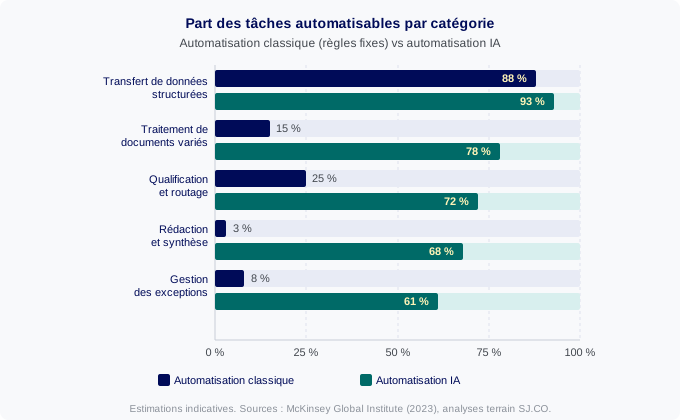
AI automation earns its place when the data varies: an invoice that arrives as a native PDF, a scanned image or a homegrown format, or a customer request whose intent has to be understood before choosing a reply. AI reads, interprets and makes a small decision where a classic script would fail. The two approaches combine rather than compete.
Where does classic automation still win?
Database synchronisation, event triggers (payment received, stock low, deadline passed), transferring structured files (CSV, XML, JSON): none of these need AI. Adding a language model here would be over-engineering. The rule is simple: if a fixed rule can do the job, leave it alone.
What does AI actually add?
AI becomes worth its cost in three situations: processing unstructured documents whose layout changes by source, contextual qualification (recognising that an angry email is not a standard request), and handling exceptions without blocking the flow or raising an alert on every edge case.
Which tasks can AI automate in a small business?
According to McKinsey (2023), generative AI could automate 60 to 70% of the time spent on repetitive tasks in administrative functions. The first profitable automations cluster around the same families regardless of company size.
How do you automate document processing?
Invoices, quotes, delivery notes: most of this stays manual in small businesses, not for lack of tools but because the format varies by supplier. An AI agent reads the PDF, extracts the key data, checks it against what was expected and raises a flag if something doesn't match. This use case is covered in more depth in AI agent for invoicing and bookkeeping.
How do you automate triage and replies?
Inbound emails, forms, support tickets: AI qualifies the request, retrieves the customer context from the CRM and drafts a reply for validation. This isn't a replacement for customer service, it's a first layer that stops the team handling simple cases by hand. The practical safeguards are detailed in AI agent for customer service.
How do you automate recurring reports?
Pulling numbers together from several sources, checking consistency, sending a weekly follow-up: AI automation fetches the data, structures it and delivers a formatted report with anomalies already flagged. The owner receives a readable summary, not a raw spreadsheet.
Which tool should you choose: n8n, Make or an AI agent?
The market has converged around two families: low-code platforms enriched with AI building blocks, and agents proper, which are more autonomous. The right choice depends on the complexity of the use case, the team's technical level and any data sovereignty constraints.
n8n: for which teams?
n8n is an open-source platform with more than 400 connectors. It runs on your own server, so data doesn't pass through a third party. That's the key argument for businesses handling sensitive data or operating in a regulated sector. n8n has native AI nodes (LLM calls, agents with memory, document processing). The ideal profile is a team with at least one technical person.
Make: for which needs?
Make (formerly Integromat) is entirely cloud-based, with more than 1,500 connectors and a visual interface accessible to non-technical teams. Its cloud model means data passes through Make's servers, which can be a constraint depending on your confidentiality requirements. Make suits medium-complexity automations on non-sensitive data.
An AI agent: when do the first two fall short?
Where n8n and Make execute a workflow you've designed, an agent decides the sequence of actions itself to reach a goal. It becomes relevant when the task is too variable to be coded as rules. Our article on AI agents clarifies this distinction before you choose a tool. In a Microsoft environment, the choice is often between a custom agent and Copilot Studio for Dynamics 365.
When does AI actually create value on an automation?
The temptation is to add AI everywhere. A language model consumes compute, introduces latency and can produce unexpected results. Call on it only when a fixed rule cannot do the job and when the value created justifies the supervision it needs.
AI creates value when data is variable or unstructured, when a decision depends on context rather than a single rule, and when exceptions need to be handled without systematic manual intervention. Outside those situations, classic automation stays more reliable and cheaper.
Processing an order whose data arrives cleanly as JSON doesn't justify calling an LLM. Extracting and reconciling data from a dozen supplier PDFs in different formats is exactly the case where AI pays for itself. Wiring an AI automation into your ERP without a prior audit can create duplicates or security gaps, which is why integrating AI into your business systems deserves to be treated as an engineering project, not a quick plug-in.
How do you get started without breaking what works?
The first risk in an AI automation project isn't the AI itself: it's starting with a process that's too complex or too critical. The right approach maps the current process first, then picks a use case that is annoying, bounded and measurable: a task the team does by hand, with a known duration and a verifiable result.
Next, document the current process fully, exceptions included. Test with real data (anonymised if necessary), not always-clean demo data. Keep a human in the loop on decisions with real stakes: a customer reply, an order change, triggering a payment. Autonomy is granted progressively, once error rates have been measured.
Funding often stalls the start. In France, Bpifrance's Diag Data IA scheme covers up to 40% of the cost of a diagnostic and roadmap for eligible SMEs. That's the lever for launching a first structured project and pricing the expected return. The best first automations are rarely the most ambitious: two hours saved a week on a tedious task in a well-defined scope. Start there, measure, then extend.
Frequently asked questions
- What's the difference between n8n and Make?
- n8n is open source and can run on your own server, so data never passes through a third party. Make is entirely cloud-based, more visual and more accessible for non-technical teams. Both offer hundreds of ready-made connectors and now include AI modules.
- Can you automate with AI without coding?
- Yes, for simple cases. Platforms like Make or n8n include AI modules (OpenAI, Anthropic, local models) that you assemble without development. Once an automation touches sensitive data, an ERP or high volumes, a custom integration becomes necessary.
- Can an AI agent replace classic automation?
- No. An agent is more computationally expensive and less predictable than a fixed rule. For moving structured data between two pieces of software, classic automation stays more reliable and cheaper. AI earns its place when something needs to be interpreted, decided on, or read from a document whose format varies.
- How is an AI automation project typically funded in France?
- Bpifrance's Diag Data IA scheme (the French public investment bank's AI diagnostic programme) covers up to 40% of the cost of a diagnostic and roadmap. Related training is eligible for funding through an OPCO (France's sector-based training funding body). A structured audit helps identify the first automations with a fast return before committing a budget.