AI Agent for Customer Service: What It Actually Does
By Alexandre Saint-Jean
Audio version
Audio version produced by text-to-speech from the article. Our AI charter
Customer service tends to carry three recurring problems in small businesses: repetitive requests that eat up too much time, customer context scattered across several tools, and response times that stretch out the moment volume rises. An AI agent does not fix everything, but it addresses precisely these three points, where a standard chatbot only filters.
How is an AI agent different from a customer service chatbot?
The difference is not cosmetic. A customer service chatbot follows a script. It asks a series of questions, points to an FAQ, or opens a ticket if the request falls outside the planned scope. It knows nothing about your specific customer.
An AI agent does something else: it reads your data. It checks order history in your CRM, reads previous tickets, verifies a delivery status or an account balance. It understands this particular customer's situation and drafts a tailored reply for the agent to approve. That loop, reading the systems, reasoning, proposing, is what distinguishes an AI agent from a chatbot.
According to Salesforce's State of Service 2024, 83% of customer service teams report a rise in request volume while budgets fail to keep pace. That is exactly the context where an agent properly connected to your tools can absorb the load without degrading quality.
What does the agent handle alone, and what stays with a human?
This is the central question before any rollout. A good split avoids two opposite mistakes: handing everything to the agent, or giving it so little that it adds no value.
What tasks does the agent take on?
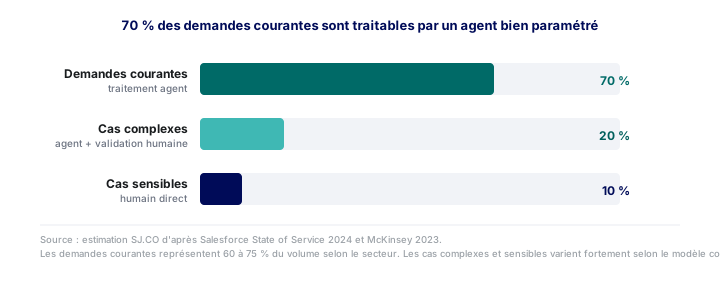
For routine, codifiable requests, the agent works without continuous supervision.
Qualifying the request. It identifies the type (product return, billing question, technical issue) and the urgency level, before an agent even opens the ticket.
Rebuilding the context. It pulls information together from the CRM, the helpdesk and the ERP, and produces a summary for the agent or directly for the customer. No more manual digging through three different tools.
Drafting a reply for approval. For questions with a clear answer (order status, refund timeline, usage instructions), it drafts a reply the agent reads, adjusts if needed, and sends. Processing time drops from several minutes to a few seconds.
Routing to the right person. If the request needs specific expertise (technical, legal, senior sales), the agent hands off with a structured summary. The customer never has to repeat themselves.
What stays human?
Three categories are never delegated to an agent, however well configured.
Goodwill gestures: discounts, credit notes, loyalty gestures. These decisions affect margin and commercial policy. The agent can prepare the case and flag that a gesture is possible under internal rules, but the decision belongs to the human agent.
Sensitive cases: an angry customer, a dispute, a legal matter, complex personal data. The agent detects these signals and hands off immediately with context, without attempting to manage them alone.
Anything outside the defined scope: any request that falls outside what was set up during configuration. A clean handoff always beats an approximate answer.
This split applies to other functions with the same logic: the same principle shows up in an AI agent for invoicing and bookkeeping, where a well-defined scope and a human in the loop are the two fundamental safeguards.
What real gains can you expect?
McKinsey (2023) rates customer service as one of the functions with the strongest potential for gains from generative AI: 30 to 45% of processing time on automatable interactions.
In practice, for a small business rolling out a first agent on routine requests, the reported results are consistent:
- Processing time cut by 50 to 70% on qualifiable requests: the agent receives a prepared case and approves or adjusts it in seconds instead of hunting for information for several minutes.
- Shorter response times: the agent processes inbound requests continuously, without a queue tied to opening hours.
- Lighter cognitive load for agents, who can focus on cases that genuinely need their judgement.
These gains are not automatic. They depend on correct integration with your existing tools, which is the real technical challenge of the project.
What safeguards do you need to put in place?
The agent's autonomy has to stay strictly bounded. Three mechanisms are essential.
Human validation on replies sent. During the launch phase, the agent reads and approves every reply before it goes out. You adjust the configuration based on the errors you observe, then increase autonomy gradually once reliability is proven.
Traceability of every action. The agent must leave a trail: what information it consulted, what reply it proposed, what decision was taken. This lets you correct mistakes and answer a customer who disputes how their request was handled.
Explicit routing rules. Rather than letting the agent decide on its own whether to hand off, define clear rules: this type of request, this level of negative sentiment, this mention of a dispute triggers a systematic transfer to a human. Without these rules, the agent tries to manage situations beyond it.
How do you actually get started?
The rollout generally follows four steps, the same ones described in AI automation for business: start small, measure, then extend.
Map the requests. Analyse three months of tickets to identify the 5 to 10 request types that make up 60 to 80% of volume. These are the priority targets for the first rollout.
Check data quality. The agent can only retrieve customer context if the data is accessible and structured. A poorly maintained CRM or an ERP without an API makes integration difficult and costly before you have configured anything.
Connect the tools. The agent needs access to your CRM, your helpdesk, and your ERP if requests touch orders or invoices. AI automation for business details common architecture patterns depending on your existing stack. For businesses that want to start without heavy development, automation with n8n offers a first no-code step before moving to a more complete agent.
Start on a narrow scope. One request type, clear measures (reply approval rate, handoff rate, customer satisfaction), gradual adjustment before extending. A prior AI assessment helps scope this effort and identify risks before you invest.
Frequently asked questions
- Can an AI agent reply to an angry customer on its own?
- No, not in a well-designed rollout. The agent detects signals of dissatisfaction, complaints and disputes, then routes the case to a human agent with a context summary. The final decision and any goodwill gesture stay human.
- What's the difference between an AI agent and a customer service chatbot?
- A chatbot follows a fixed decision tree and can only answer questions planned in advance. An AI agent reads a customer's actual data (orders, tickets, history), reasons about their situation and drafts a personalised reply. If the question falls outside its scope, it hands off to a human instead of looping through a menu.
- How much does it cost to set up an AI agent for customer service?
- It depends on what you already have. If your CRM or helpdesk has an API, a first agent can be live within a few weeks. The main cost is integration work and defining routing rules. A short AI assessment prices the actual effort against your stack before you commit.