AI Automation with n8n: A Practical Guide for SMEs
By Alexandre Saint-Jean
Audio version
Audio version produced by text-to-speech from the article. Our AI charter
n8n has become, in a few short years, a go-to tool for teams that want to automate without depending on a single SaaS vendor. As language models took off, its AI nodes turned it into a natural entry point for connecting artificial intelligence to everyday tools. Here is what it does well, what it does not, and how an SME can put it to use.
What is n8n, exactly?
n8n is an open-source, visual automation tool. It works as a graph: you place nodes (each node represents an action or a connector) and link them to build a flow. A flow can be triggered by an event (an inbound webhook, a received email, a new database record) and chain as many steps as needed.
What sets n8n apart from its direct competitors, Make and Zapier, comes down to two points. First, the code is open: you can audit exactly what it does with your data. Second, it is self-hostable: you install it on your own server, and your data never passes through a third party's infrastructure. For businesses that care about data sovereignty, that carries real weight, particularly within AI automation for business, where ERP and accounting data are sensitive.
n8n now offers more than 400 connectors (Slack, Gmail, HubSpot, Notion, SQL databases, REST APIs) and a JavaScript execution layer for cases that fall outside the standard templates.
Why is n8n a popular choice for AI workflows?
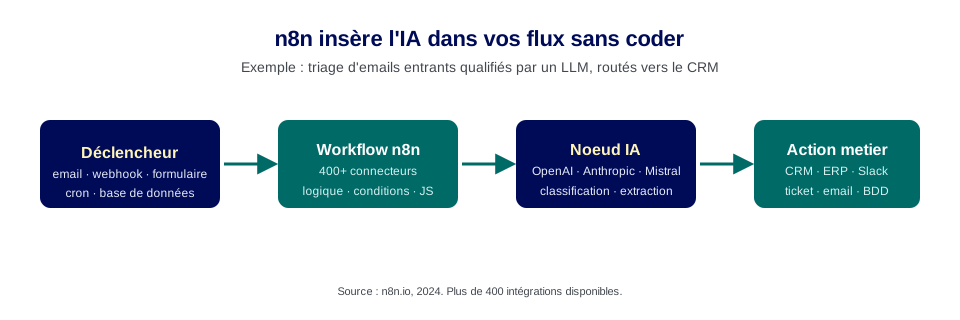
n8n's AI capability sits on dedicated nodes, available natively since version 1.0. These include direct connections to OpenAI, Anthropic, Mistral, Hugging Face and other providers. These nodes let you drop an LLM call into any step of a flow: analysing an inbound text, classifying an email, extracting structured data from a document, drafting a reply.
The practical upside: you do not need to code a full API integration. The OpenAI node, for example, handles authentication, request formatting and error handling. You configure the prompt, connect the input data, and test it live from the interface.
n8n also lets you chain several AI calls: a first node classifies, a second rephrases, a third decides on an action based on the result. This is what's known as an AI pipeline, a chained sequence of intelligent processing steps over a data flow. To go further on agentic logic beyond workflows, our guide to no-code AI agent tools usefully complements this overview.
What concrete AI workflows can you build with n8n?
Three use cases come up repeatedly in SMEs and lean ops teams.
Qualifying inbound leads. When a contact form is submitted, an AI node analyses the message, detects the industry and the maturity level of the request, then assigns a score. n8n routes the lead to the right salesperson in the CRM, with a note summarising the qualification. What used to take ten minutes of manual triage now happens in seconds.
Triaging support emails. Inbound emails are read by an AI node that identifies the nature of the request (refund, delivery delay, product issue) and its urgency. n8n automatically creates a ticket in your support tool, with the right label and priority. The similar flow described in our article on AI agents for customer service shows what you can push further once an agent replies directly.
Extracting data from invoices. A PDF invoice arrives by email. n8n intercepts it, sends the file to an AI node (vision or text extraction), retrieves the key fields (amount, invoice number, supplier, date) and inserts them into your ERP or spreadsheet. This flow eliminates a manual re-entry step that is a common source of errors. Our article on AI for invoicing and bookkeeping goes further into this case with the accounting safeguards involved.
Self-hosted or cloud: what does it change for data sovereignty?
The n8n cloud version is hosted by the vendor on European servers. It is convenient to get started, but your workflow data passes through their infrastructure.
The self-hosted version installs on your own server (VPS, internal machine, Kubernetes). Your data never leaves your boundary. This is the recommended setup as soon as your flows handle customer data, financial data, or information covered by GDPR. A suitably sized VPS (2GB RAM, 2 vCPU) costs €5 to €15 a month with most European hosting providers.
One important point: even self-hosted, AI nodes that call third-party APIs (OpenAI, Anthropic) send data to those providers. For full sovereignty, n8n needs to be paired with a local model (Ollama) or a European AI provider. This is a structural choice for businesses handling sensitive data in their automated flows.
What are n8n's limits?
n8n orchestrates flows defined in advance. It does not reason, it does not adapt to the unexpected. If a case falls outside the planned template, the flow fails or branches into an error path. That is the fundamental difference from an AI agent, which decides its own path at run time. This is covered in detail in AI automation for business, which positions n8n among other complementary building blocks.
Other practical limits worth keeping in mind:
- Growing complexity. A flow with more than 30 nodes becomes hard to maintain without documentation and testing. Business rules need to be made explicit and versioned.
- Silent errors. A node that returns an empty value can let the flow carry on without triggering an alert. Validation nodes and anomaly notifications need to be built in systematically.
- Scaling. n8n supports parallel execution, but a spike of simultaneous triggers on an undersized VPS can jam the execution queue. Plan capacity from the start if the flow is business-critical.
- Credential management. n8n stores API keys in its database. Poorly configured access rights can expose critical secrets. Access rights to the instance need the same rigour as access to an ERP.
How do you get started with n8n in an SME?
The right approach is the same as for any AI project: pick a simple, measurable, low-risk use case. A flow that qualifies inbound emails or extracts data from a PDF is a solid first step. Test it manually, measure the gain, extend what works.
The official n8n documentation offers hundreds of templates for common cases. It is often faster to start from an existing template than to build from scratch. The community is active, sharing and discussing flows for most common business tools.
For SMEs that want to go further, pairing n8n with an AI agent is the next step: n8n handles the triggers and actions on your tools, the agent makes the decisions mid-flow. This split is precisely what makes AI architectures robust and maintainable beyond the pilot stage. To scope this step with a structured assessment, AI automation for business gives you the reference points for sequencing the rollout.
Frequently asked questions
- Is n8n free?
- n8n's source code is open source, and self-hosting is free. n8n also offers a paid managed cloud from roughly €20 a month, with a tiered limit on execution nodes. Most SMEs start self-hosted on a VPS costing €5 to €10 a month.
- Can n8n replace an AI agent?
- No, the two are complementary. n8n orchestrates flows between applications according to rules set in advance. An AI agent decides its own path at run time, reasoning over context. n8n can call an AI agent as one step in a flow, and an agent can trigger an n8n workflow to carry out a concrete action.
- Do you need to know how to code to use n8n?
- No, for simple flows: the interface is visual, block-based, and hundreds of templates are available. Yes, for advanced cases: JavaScript expressions, custom webhooks, complex conditional logic. An ops team with basic skills manages fine. For ERP integrations or sensitive flows, technical support is still advisable.
Sources
Go further
AI automation for business