AI Agent for Invoicing and Bookkeeping: What It Automates
By Alexandre Saint-Jean

Audio version
Audio version produced by text-to-speech from the article. Our AI charter
Invoicing concentrates the tasks nobody enjoys: keying in data from a PDF, checking that a line matches a purchase order, chasing a late-paying client, preparing the month's reconciliation. Repetitive, rule-based, prone to typing errors: these tasks sit squarely in AI agent territory.
Here is what an agent can do on your invoicing and bookkeeping processes, how to set it up so it stays reliable, and where an SME should start.
What does an AI agent actually do with your invoices?
An AI agent dedicated to invoicing does not work like a simple data extractor. It reads an incoming invoice, pulls out the key fields (supplier, amount, date, invoice number, VAT), then checks them against your internal records: purchase order, goods receipt, negotiated contract terms.
After this first pass, it sorts each invoice into one of three piles.
- Matching: the data lines up, no discrepancy detected. Ready to approve in one click.
- Minor discrepancy: a marginal difference (rounding, unexpected shipping costs). The agent documents it and suggests how to handle it.
- Needs a decision: a significantly different amount, an unknown supplier, an implausible date. The agent flags and documents it, but touches nothing.
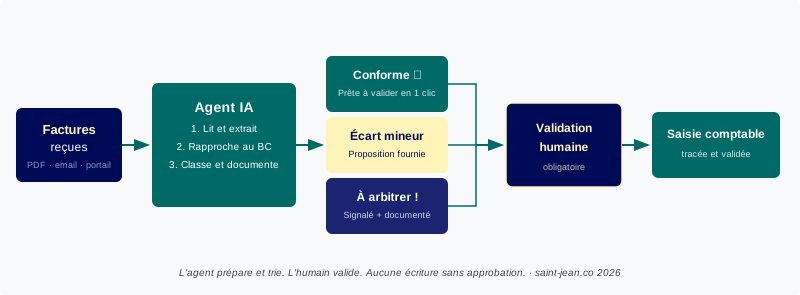
This pre-sorting logic changes the workload. Instead of working through a hundred invoices, the finance manager only handles the two or three that actually need attention. It is the same logic covered in agentic AI in finance, applied here to supplier invoice processing specifically.
What bookkeeping tasks can the agent take on?
Beyond reading invoices, an agent properly connected to your systems can cover several other high-volume tasks.
Bank reconciliation. The agent checks bank statement lines against pending entries, proposes matches for transactions it can identify without ambiguity, and isolates unrecognised lines for human review. What used to take half a day at month end becomes a short list of exceptions.
Client payment reminders. The agent monitors due dates, identifies overdue invoices and drafts a pre-filled reminder (amount, reference, due date). You send it or edit it in one read. This is close to what automation tools like n8n or Make already do on simple workflows, with the added nuance that the agent adapts its wording to each client's context.
Bookkeeping pre-processing. The agent suggests an account code for each line, based on your entry history and configured chart of accounts. This is not bookkeeping, it is preparation. The accountant approves the classification instead of hunting it down.
Cash flow reporting. The agent pulls together pending invoices, upcoming due dates and bank balances into a 30, 60 and 90-day forecast. An export ready to review, not a table to build from scratch.
All of these cases share the same structure: the agent does the first pass, a human checks and approves. That split is not optional, it is the ground rule.
What does the agent prepare, and what does a human approve?
The line is non-negotiable, and it is simple to state: no final entry, no payment, and nothing sent to a third party goes out without human validation.
The agent can suggest a bank transfer, put together a payment file, calculate an amount due. It cannot press "send" itself. This rule protects on two fronts. First, language models make mistakes: a misread amount, a supplier confused with a similarly named one, a misread date. Second, legal responsibility stays entirely human: neither the agent nor its vendor answers for an incorrect bookkeeping entry.
In practice, this shows up as approval queues inside your tool: the agent feeds a queue, the finance manager approves in batches, and every action is logged (who approved, when, on what basis). That same supervision layer is also what lets you audit the agent's behaviour and fix its systematic errors over time.
This logic applies everywhere an agent acts on a human's behalf. We cover it in more depth in our article on customer service agents, another area where the same line matters just as much.
What gains can an SME realistically expect?
Estimates vary widely depending on invoice volume and how structured your processes already are. Here are order-of-magnitude figures observed on well-scoped deployments.
- Data entry time: cut by 60% to 80% on matching invoices, which then only need a quick approval.
- Data entry error rate: sharply reduced, because the agent reads the source document directly instead of manual re-keying.
- Bank reconciliation time: drops from half a day to under an hour for an SME processing 200 to 500 entries a month.
- Client reminders: fully systematised without mental overhead. An SME with 30 active clients can automate 90% of first-level reminders.
These gains are conditional: they assume clean integration with your accounting software, properly configured business rules, and a one-to-two-month settling-in period during which the agent learns your context.
Anthropic's work on effective agents points out that the most profitable deployments are also the simplest: a defined scope, clear rules, a human in the loop. In invoicing, those conditions come together more often than elsewhere. Bpifrance reports the same trend among French SMEs adopting AI on administrative processes: the value comes from targeted use cases, not general-purpose rollouts.
What safeguards should be in place before you start?
Several principles shape a serious deployment, whatever tool you choose.
Scoped access rights. The agent should only access what it needs: read invoices, consult the chart of accounts, suggest classifications. It should never have direct write access to your bank account or payroll system.
Full traceability. Every action the agent takes should be logged: which invoice, what treatment was proposed, what decision the human made. If something goes wrong, an audit should take minutes, not days.
A documented approval workflow. Decide upfront who approves what, and within what timeframe. An agent that drafts reminders with nobody clearly assigned to approve them adds no value, it just adds noise.
Regular supervision. During the first weeks, review the proposals that get rejected or edited. That is where you spot the systematic errors worth fixing. An invoicing agent improves with human feedback, provided that feedback is given in a structured way.
If you operate in France, the mandatory e-invoicing reform, rolling out from 2026 for large companies and progressively to SMEs, makes these safeguards even more relevant: invoice flows become structured by default, which makes agent integration easier but also raises the bar on compliance and traceability.
Where should an SME start?
The starting point is not choosing a tool, it is mapping the flow. Where do invoices come from (email, supplier portal, EDI)? What software runs your bookkeeping? How many invoices a month, and how complex are they?
These questions determine the level of integration you need. For an SME with a simple flow and standard software, an automation solution like n8n or Make can be enough for the most repetitive cases. For a larger volume or a complex ERP, integration becomes a proper engineering project, with security and access-rights questions we cover in our guide to automating AI across your business workflows.
Either way, good practice is to start with a single flow, supplier invoices for example. Measure the gain, fix the agent's mistakes, then extend. That incremental approach is also what we recommend in our general guide to AI automation for business.
A dedicated AI diagnostic can frame exactly this first step: identifying the most profitable flow to automate in your context, costing the integration effort and sequencing the rollout. For an SME operating in France, that diagnostic can fall under a publicly funded scheme: see our guide to Bpifrance's Diag Data IA eligibility and process. Start small, measure, and only automate what actually works.
Frequently asked questions
- Can an AI agent replace a bookkeeper or accountant?
- No. The agent prepares and checks, but the accountant remains responsible for the tricky classifications, closing the books and signing off. The agent cuts down data-entry time, not legal responsibility or accounting judgement.
- Can the agent connect to the accounting software I already use?
- Yes, in most cases. Major platforms such as Xero, QuickBooks and Sage all offer APIs or exports the agent can work from. Integration takes configuration, not a change of software.
- What happens if the agent gets an amount wrong?
- The risk is real, and it is exactly why the agent never validates anything on its own. It prepares a file that a human checks before any entry is finalised. Reliability comes from the approval workflow, not from blind trust in the model.