AI in Your ERP: From Pilot to Production Deployment
By Alexandre Saint-Jean
Audio version
Audio version produced by text-to-speech from the article. Our AI charter
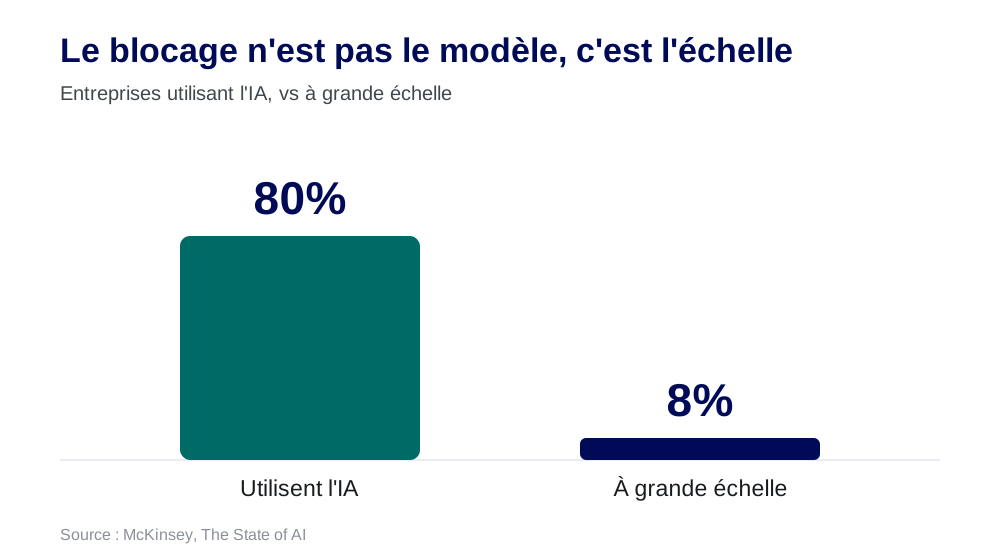
Most companies already use AI somewhere, but very few at scale. According to McKinsey, a large share stays stuck at the pilot stage. The blocker is almost never the model. It is the move from pilot to production, where AI meets real data, undocumented processes and an existing IT system.
Why do so many AI pilots never reach production?
The scenario has become a classic: an impressive demo in a few hours, then nothing for six months. The pilot worked, production never followed. This is not a model problem, it is a ground-truth problem.
The myth of the model
There is a common belief that the hard part is picking the right model. In reality, the models available today are more than good enough for the vast majority of an SME's use cases. What actually gets stuck is elsewhere: the data and the process.
The real friction points
Four obstacles come up again and again when trying to industrialise a pilot:
- Data quality: a copilot is only as good as the data it queries. Empty fields, duplicates, inconsistent reference data derail production even when the demo, run on a clean sample, worked fine.
- Undocumented processes: business knowledge lives in people's heads. AI needs that knowledge made explicit to become reliable.
- Integration with the IT system: a useful agent is one connected to the ERP, the CRM, the messaging platform, not an isolated chatbot.
- Adoption: without team support, even the best-performing tool goes unused. This is also why training matters (see how to fund an AI project).
Where does AI actually create value?
In your business tools. An AI agent only matters when it is connected to your real data. In a Microsoft environment, that runs through Copilot Studio and Power Platform, sitting on Dataverse, so directly on your ERP and CRM data. Dynamics 365 already embeds copilots by domain: sales, customer service, finance, supply chain.
The Microsoft environment, building block by building block
For a company already running Microsoft, AI assembles from components that speak directly to your data:
- Microsoft 365 Copilot: the assistant across your documents, emails and meetings, via Microsoft Graph.
- Copilot Studio: the workshop for building custom agents and connecting them to your data and actions.
- Power Platform and AI Builder: automation and ready-made models, sitting on Dataverse.
- Dynamics 365 Copilot: business copilots built into the ERP and CRM.
- Microsoft Foundry (formerly Azure AI Foundry): the platform for more advanced agents and models.
The choice between a native copilot, a Copilot Studio agent and a fully custom agent deserves its own article: I cover it in Copilot Studio vs a custom agent, which one to choose.
What are concrete AI use cases inside an ERP?
The use cases that actually reach production are precise and measurable. The most common ones:
- A natural-language copilot over your ERP data, to query stock, orders or margin without knowing the screens or writing a query.
- Document reading: supplier invoices, delivery notes, contracts, with automated extraction and entry. This is often the first profitable use case, because it removes tedious manual data entry.
- Forecasting: demand, stock levels, cash, based on the ERP's own history.
- Automated reporting and configuration assistance, which save back-office teams a considerable amount of time. On the reporting side, AI applied to your dashboards extends directly from the ERP's data.
None of this is hypothetical. In my own e-commerce ERP, these building blocks run in production: invoice reading, categorisation, and pricing and restocking decision support.
What is the right way to work?
Embedded. A role is emerging around this idea: the Forward Deployed Engineer, popularised by Palantir and now used by OpenAI and Anthropic. The idea is to embed with the client to ship AI into production on their real data, in days or weeks, rather than hand over a consulting report nobody implements.
What I recommend, I run first on myself: AI is built into my own e-commerce ERP.
In practice, that means working on a well-scoped use case, with your data, aiming for a fast production launch rather than a study. You loop, you measure, you extend. That is what separates a deployment that sticks from just another pilot.
What about keeping control of your data through all this?
Sovereignty stays native to this approach: you choose the right level of data control (EU residency, a European model, or self-hosted) based on how sensitive the context is. Embedding AI in an ERP does not mean sending all your data to a third party, a point covered in use AI without losing control of your data.
For ERP integrators and IT services firms
Many integrators already have the clients and the framework, but not yet the in-house AI skills. In that case I work as a co-delivery partner: you keep the client relationship and the project, I bring the AI building block and get it into production. It is a way to embed AI in your deliverables without hiring or losing focus, while keeping ownership of the relationship.
Whether you run Dynamics as an SME or you are an integrator looking to strengthen your offer, the starting point is the same: a real use case, your data, a fast route to production.
Frequently asked questions
- Which platforms can you use to embed AI in an ERP?
- Mainly the Microsoft environment (Copilot Studio, Power Platform, Azure AI Foundry, Dynamics 365 Copilot), connected to data through Dataverse and connectors, alongside custom-built agents depending on the wider IT system.
- What are concrete AI use cases inside an ERP?
- A natural-language copilot over your ERP data, document reading (invoices, delivery notes, contracts), categorisation, forecasting (demand, stock, cash), a configuration assistant, and automated reporting.
- What about keeping control of your data?
- The integration is designed around the right level of data sovereignty (EU data residency, European or self-hosted models) depending on how sensitive the context is.
- Do you need to replace your ERP to add AI to it?
- No. The goal is to embed AI on top of your existing ERP and its data, through copilots and agents connected to the data layer (Dataverse in the Microsoft world) and connectors. You add a layer of intelligence, you do not rebuild your IT system.
- How long does it take to get a first use case into production?
- A few days to a few weeks, when you work in embedded mode on a well-scoped use case with data that is actually available. That is the whole point of the Forward Deployed Engineer model: ship into production fast, on a real scope, rather than deliver a report.